
Stockkeeping at Different BOM Levels 
When using strategy 52, 63, 50, 60, or similar strategies for the finished product, certain issues arise as to the level on which the materials should be kept in stock.
You can choose between the following options, illustrated in the graphic below:
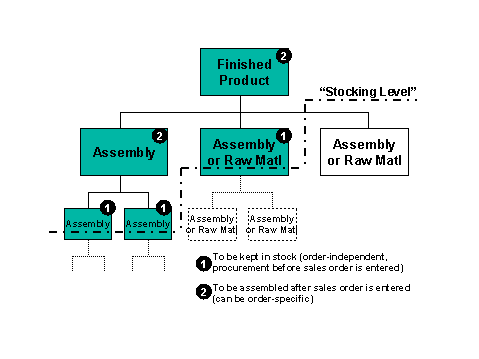
Stocking Level Two Levels Below the Finished Product
This corresponds to the assembly on the left-hand side of the above graphic. The components should be assembled during the Procurement After Sales Order stage, whereas the components of the assembly should be kept in stock (during the Procurement Before Sales Order stage, on the basis of planned independent requirements, and not assigned to a specific sales order).
Maintain the master data as follows:
- The assembly must have the Special procurement key set to 60 (Phantom in planning) on the MRP2 screen. This means that the assembly is not built until a sales order exists for the finished product. There will, however, be a planned order (and production order) for the assembly once the sales order has been entered.
- The Individual/coll. indicator must be set to 2 on the MRP4 screen for the components of the assembly if the finished product is make-to-order (strategy 50 or 60). The components are procured in accordance with the planning at finished product level.
Stocking Level One Level Below the Finished Product
This corresponds to the assembly in the center of the above graphic. The components should be assembled during the Procurement Before Sales Order stage and should be kept in stock, without being assigned to a specific sales order.
Maintain the master data as follows:
- The Individual/coll. indicator must be set to 2 on the MRP4 screen for the component / assembly if the finished product is make-to-order strategy 50 or 60. The components are procured in accordance with the planning at finished product level.
This is probably the most common way to use the strategies without final assembly (52, 63, 50, 60).
No Components Stored on Level Below the Finished Product
This corresponds to the assembly / component on the right-hand side of the above graphic. The components should be assembled during the Procurement After Sales Order stage, and should not be kept in stock. If the finished product is assembled according to make-to-order (strategy 50 or 60), the component is also assembled according to make-to-order. There will be a customer-specific segment in the stock/requirements list.
Maintain the master data as follows:
- The Individual/coll. indicator must be set to 1 or left blank on the MRP4 screen for the component / assembly. The components are not procured until a sales order exists for the finished product.

If you are working in a make-to-order environment, do not forget to set the Individual/coll. indicator again for the levels below this assembly until you reach an assembly which is set to 2, or which is not planned at all. Otherwise the whole structure below this assembly would be produced according to make-to-order.