
 Replenishment up to Maximum Stock Level
Use
You use the lot-sizing procedure Replenishment up to maximum stock level if you want to fill the stock up to the highest possible level or if you can only store a certain quantity of a material due to the container size. This applies to a tank, for example. The capacity of the tank determines the maximum stock level.
Integration

You can use this lot-sizing procedure with reorder point planning or MRP.
Prerequisites
You have set the indicator HB in the Lot size field and the maximum quantity to stock in the Maximum stock level field in the material master (MRP 1 view) for the material.
Features
- In material requirements planning, the system creates an order quantity to bring the stock level up to the maximum stock level. If, however, the requirements for one day are greater than the maximum stock level the system creates an order quantity for the required quantity. In this case, a balanced stock/requirements situation is given higher priority than the lot-sizing procedure.
- In reorder point planning without taking external requirements into account you only use stocks. MRP then calculates the lot sizes as follows:
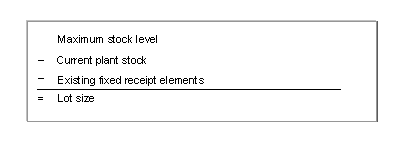
- In reorder point planning where external requirements are taken into account, where additional requirements are also included in the calculation, MRP tries to achieve two goals:
- All requirements must be covered
- Once requirements have been covered, the defined maximum stock level must not be exceeded, but also does not have to be reached
The requirements dates are not taken into account. The system calculates the total of all requirements.
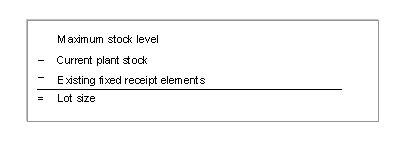
The calculation of the lot size occurs in two steps using two formulas:
Formula 1
Formula 2
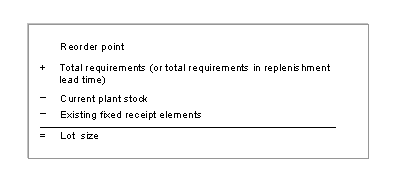
The system creates the order proposal using the greater of the two lot sizes calculated.
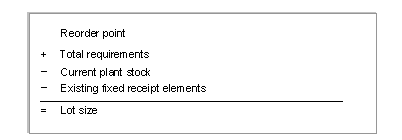
- For reorder point planning where external requirements are taken into account as well as MRP there is an additional option, whereby you can set the Maximum stock level variant 1 (Maximum stock level after covering requirement). The MRP thus tries to achieve the following two aims:
- All requirements must be covered
- The defined maximum stock level must be reached after covering the requirements
The system calculates the lot size using the following formula:
Example
Example Data
|
Maximum stock level |
5.000 |
|
Reorder point |
2.000 |
|
Current plant stock |
1.000 |
|
Existing fixed receipt elements |
None |
|
Total requirements |
4.000 |
Lot-Size Calculation
|
1. Reorder point planning without taking external requirements into account |
5.000 - 1.000 = 4.000 |
|
2. Reorder point planning where external requirements are taken into account |
Formula 1: 5.000 - 1.000 = 4.000 Formula 2: 2.000 + 4.000 - 1.000 = 5.000 (this value is the larger and is copied over) |
|
3. Reorder point planning where external requirements are taken into account or MRP, maximum stock level variant 1 |
5.000 + 4.000 - 1.000 = 8.000 |