
 Subcontracting/Third-Party Order Processing
Use
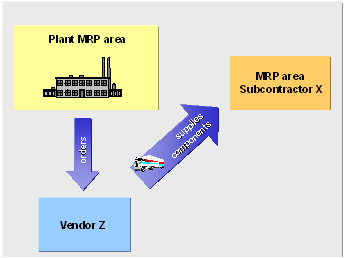
If you plan for the components to be provided for a subcontractor with an MRP area of the subcontractor type and the components to be provided are procured externally, you can process the procurement of these components using subcontracting/third-party orders.
This type of processing has the advantage that the required components to be provided are delivered directly from the vendor, from whom you order this material, to the subcontractor.
Prerequisites
- In Customizing for MRP, you have created a special procurement key for External procurement with delivery directly to the subcontractor. To do so, you enter an F for External procurement in the procurement type field. This special procurement key is the special procurement key 20 for External procurement in the standard system.
- In the material master records of the components, you have created the MRP area segment for the MRP area of the subcontractor and assigned the special procurement key to it.
- You have entered the special procurement key for subcontracting in the material master of the assembly that the subcontractor produces.
- You have created a source list entry for the assembly that the subcontractor produces. In this, you have entered the subcontractor as a fixed vendor and have set the indicator 1 for relevant to MRP in the MRP field (see also Determining Source of Supply for External Procurement).
Features
During the planning run, the system determines the subcontractor X as the vendor for the assembly using the source list and creates a purchase requisition for the assembly.
The BOM of the assembly is exploded. The dependent requirements of the components to be provided are assigned to the MRP area of the subcontractor X.
The system creates one or several purchase requisitions (depending on lot size) for the dependent requirements, which you can convert to purchase orders. These purchase orders are subcontracting/third-party orders.
When you display a subcontracting/third-party order, you will see the subcontractor’s address in the space for the delivery address. The SC stock indicator X for stock with subcontractor is set. The item type and account assignment type fields do not contain any values.
Activities
The components to be provided are delivered directly to the subcontractor. The goods receipt is posted to the stock with subcontractor.
When the subcontractor has delivered the finished assembly, the goods receipt is posted to the subcontract order. The stock with subcontractor and the reservations are then reduced.