
 Planning Table (tabular form)
In the planning table (tabular form) available capacity and capacity requirements are shown in a period split. You can dispatch the capacity requirements to specific periods. You cannot dispatch capacity requirements to a period in a specific sequence.
You can start the planning table (tabular form) from several R/3 applications. The data is formatted according to different views depending on requirements (for example, the capacity situation of a work center, the capacity situation of all the work centers involved with an order).
Unit of available capacity and capacity requirements
You specify the unit in which available capacity and capacity requirements are displayed in the evaluation profile in Customizing for capacity planning. The available capacity and capacity requirements need not be displayed using a unit of time. You can also display the number of pieces as the available capacity that can be produced at a work center. You must define the conversion between the dimension "time" and other dimensions in work center maintenance or capacity maintenance.
Layout of the capacity planning table (tabular form)
The planning table (tabular form) is divided up into a resources section and a requirements section (see following graphic).
Resources section
In the upper section of the planning table (tabular form), the resources section, the following data is usually displayed for every period:
- Name of the work center or the capacity and capacity category
- Periods in which you can dispatch operations
- Available capacity of the work center in the capacity category affected
- Capacity requirements due to operations already dispatched in a period
- Capacity requirements due to operations not yet dispatched to a period
Requirements section
In the lower section of the capacity planning table (tabular form), the requirements section, the system can display operations that have been dispatched and/or operations that have not yet been dispatched. Which requirements are displayed is defined in the period profile in Customizing for capacity planning. If you want to change the setting for the current capacity leveling, choose the following menu options in the capacity planning table (tabular form): Settings -> Requirements filter and one of the menu options: Dispatched reqmts, Reqmts not dispatched or All requirements.
You can define other data to be displayed such as the name of the material, the quantity, order number, operation number using the field selection. You can find more information in Field selection.
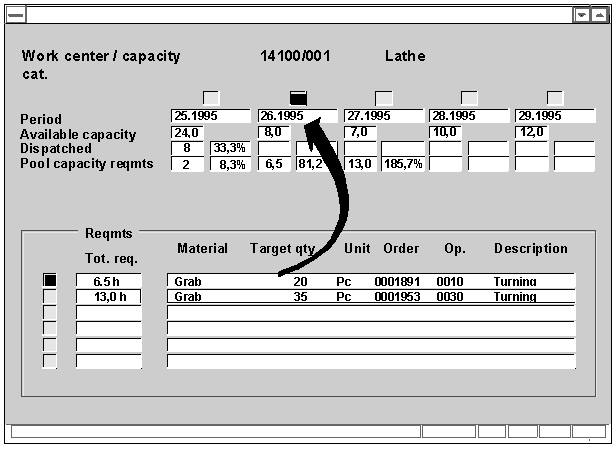
The requirements of the activated periods are displayed in the requirements section of the planning table. If you want to activate a period place the cursor on a field in the period and choose the menu options: Edit -> Period -> Activate period
Dispatching takes place for example by selecting a capacity requirement in the lower section of the capacity planning table (tabular form) and assigning it to a period in the upper section of the capacity planning table (tabular form).
You can also display the remaining available capacity for several work centers and capacities for each period using a second view on the capacity planning table (tabular form). You can find relevant information in Changing the view in the capacity planning table (tabular form).