
 Capacity Leveling or Capacity Situation
In MRP or MPS data is displayed in two lists in which the planning periods are shown on a vertical axis.
- Capacity leveling
- Capacity situation
The capacities are displayed in the same way in both lists. However, whereas you can change data in the capacity leveling list and carry out capacity leveling, you can only display data in the capacity situation.
You can call up the capacity situation or capacity leveling for all planned orders for one material or just for a single planned order. In the following graphic the capacity situation was called up for one planned order.
The following data is displayed for a work center for specific periods:
- Available capacity at the work center in a period
- Total capacity load at the work center caused by all planned- /production orders in a period
- Capacity requirements in a period for the material for which a planning run has been carried out
If the capacity situation or capacity leveling has been called up for a planned order then the capacity requirements for the planned order in a period is also displayed.
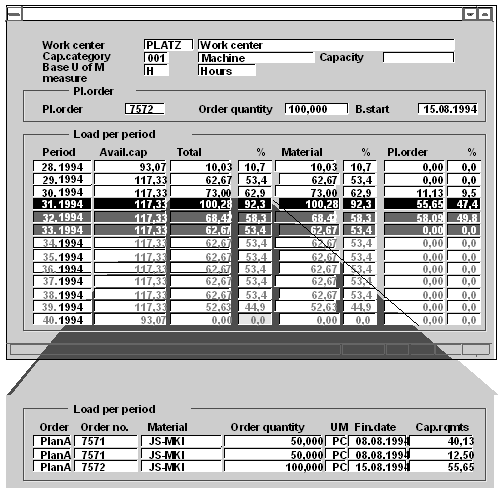
If the material is processed at several work centers then you can display the data for the various work centers sequentially.
By changing the order quantity and the basic finish date you can reduce under- and overloads at a given work center.
You can call up capacity leveling or the capacity situation from within the following functions:
- Master production scheduling:
- from the planning result of single-item planning
- from the planning result of interactive planning
- from planned order processing
- from the stock/requirements list
- Material requirements planning:
- from the planning result of single-item planning
- from planned order processing
- from the current stock/requirements list
- Long-term planning
- from the planning result of single-item planning
- from the current stock/requirements list
You can find information on accessing functions, from which you can carry out capacity leveling or check the capacity situation, in
Carrying out single-item planning
Carrying out interactive single-item planning
Current stock/requirements list