
 Starting a Mass Change
To start a mass change:
- Choose Logistics → Production → Master Data → Bills of Material → Extras → Mass Changes.
You jump to the Mass Changes screen: Selection for Material.
- Select the object type for the reference object. If you want to start a mass change for a document or a class select Document and. Class.
The system automatically adjusts the selection criteria, the BOM categories and the item changes fields in the object type of the reference object.
- Enter selection criteria in order to include the BOMs you want to change.
- Item data
- Item category
If the object is only to be replaced in BOMs where it has a certain item category, enter the item category. For example, you can replace a material component everywhere where it is defined in a BOM as a stock item.
- Change number
If you enter a change number, the system selects the change status that is valid on the date of the change number or on the alternative date.
Furthermore, the system carries out all changes with reference to this change number.
- Valid from and Valid to dates
Enter a valid from date or a time period. The system only selects items whose validity periods overlap with those that you have entered.

For example, you enter in the selection criteria the valid from date 1.4. and the valid to date 1.9. The system selects all item change statuses valid in this period.
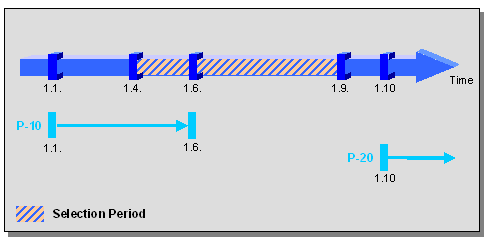
- Item P-10 is effective between 1.1. and 1.6. It is selected because part of its effectivity falls within the period that you entered.
- Item P-20 was created on 1.10. It is not selected because its effectivity does not start until after the end of the selection period (1.9.).
- BOM Data
- Use
- Plant
- Maximum Number (only Material Items)
- BOM Number (only Material Items)
- Select the BOM categories to which you want to apply the mass changes.
- Select the function that you want to execute, for example, change BOM data.
The system automatically adjusts the fields for the item changes to the selected function.
- Enter the data for the item changes.
- Click on
 to check the entries.
- Click
 .
.
The system selects a BOM that matches the selection criteria and displays it in a list.
See also: