Before You Create Your BOM
Before you create a multiple BOM, please note:
- The material BOM for which you want to create an alternative cannot be a variant BOM.
- Does the BOM for which you want to create an alternative have a history requirement?
If so, which change number do you use?
If you want to make the change with reference to an engineering change request (ECR), the ECR must first be converted to an engineering change order (ECO).
- All the alternatives of one multiple BOM form a BOM group. Within the BOM group, each item has a unique item ID. You can enter the same item ID for logically-related items, such as different versions of an item.
Multiple BOM: Example
One model of the racing bicycle HRR01 is produced in blue. The assembly BLUE_FRAME contains component PAINT01 (blue paint).
This component is also an assembly, and contains the following material components:
- Pigment
- Solvent
- Water
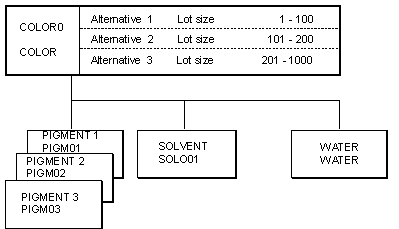
Depending on the lot size, the quantities of these components change. There are 3 alternative BOMs (alternatives) for assembly PAINT01:
Alternative 1 Lot size 1-100
Alternative 2 Lot size 101-200
Alternative 3 Lot size 201-1,000
The following graphic shows the 3 alternatives of multiple BOM PAINT01.