Before You Create Your BOM
Before you create a variant BOM, please note the following:
- The material for which you want to create a variant of an existing BOM must not have a BOM.
- The BOM of the material that you want to use to create a variant cannot be a multiple BOM.
- The material whose BOM (variant BOM) you want to copy must have a BOM with the same usage as the one you selected for your new variant.
- Does the BOM that you want to use to create a variant have a history requirement?
If so, which change number do you use? If you want to make the change with reference to an engineering change request (ECR), the ECR must first be converted to an engineering change order (ECO).
- The base units of measure of the variant materials must be the same, because the BOMs base unit of measure must be the same as the base unit of measure in the material master record.
- All the variants of one variant BOM form a BOM group. Within the BOM group, each item has a unique item ID. You can enter the same item ID for logically-related items, such as different versions of an item.
Variant BOM: Example
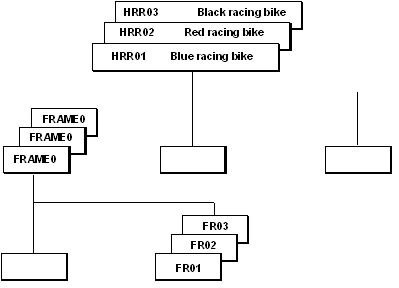
The racing bicycle HRR01 is produced in the following color options:
- Blue frame
- Red frame
- Black frame
This means that there are 3 similar products (variants) with different colored frames.
There are 3 different variants of assembly Preassembled frame and forks:
FRAME01 With component FR01 (Blue frame)
FRAME02 With component FR02 (Red frame)
FRAME03 With component FR03 (Black frame)
The following graphic shows the 3 variants in the variant BOM for this bicycle.