
 Area of Validity
Material BOMs can be valid on different organizational levels:
- You can use a material BOM to manage data that applies directly to production. This is why the area of validity is the plant. The plant is the location where all necessary work-scheduling procedures are organized, such as MRP and creating routings.
In this case, you create a plant-specific BOM. - However, you can also create a group BOM, without reference to a plant. For example, a designer maintains a group BOM during the design phase of a product, then the BOM is allocated to one or more plants for production purposes.

You can extend the area of validity of a BOM by allocating the same BOM to a material in different plants.
Group BOM
If you create a material BOM without reference to a plant, the BOM is valid throughout your company. To do this, you leave the Plant field blank. The system checks whether material masters exist. There are no system checks for plant data.
Plant-Specific Material BOM
If you create a material BOM with reference to a plant, the system makes a number of checks. A material master record with plant data for the relevant plant must exist for the BOM header material. When you enter items, the system checks whether plant data exists for the material components (see Extending the Area of Validity).
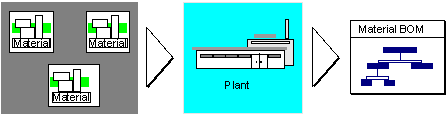
The following graphic shows the checks for creating a material item in a plant-specific BOM. First, the system checks whether the material master record exists. Then the system checks the plant-specific material data. If these checks are successful, the system accepts the material in the material BOM.

You create equipment BOMs for a specific maintenance planning plant. However, equipments are managed at client (group) level, not at plant level.
Usually, the system checks plant data for a BOM item, but there is a special item category for BOM items that are relevant to plant maintenance, so the system does not check plant data for these items.
Extending the Area of Validity
You can extend the area of validity (plant or group) that was defined when a BOM was created. To do this, you allocate the same bill of material to a material in different plants.
- You can allocate a BOM created in a specific plant (such as 0001) to additional plants (such as 0002 and 0003) or to the entire group (blank).
- You can allocate a group BOM to individual plants.

These related BOMs are identified in the R/3 System by a common internal BOM number. This internal BOM number is displayed on all screens for plant allocations.
Before you can allocate the same BOM to a material in different plants, the following must apply:
- The material whose BOM you want to allocate to an additional plant must have a material master record in the new plant.
All material items in the BOM must have valid material master records in the new plant.

If the BOM is only relevant to plant maintenance, you can allocate the BOM to plants where no plant data exists.
- If the unit of issue is maintained in a BOM item, this unit must be the same in all plants.
- If the BOM contains a non-stock item that has a cost element, the system checks the account.
If the cost element is for primary costs, the system checks whether the G/L account exists for the company code. The system uses the valuation area and the plant to which the BOM is allocated to determine the company code.
Secondary costs are only maintained in cost accounting.
- Before you can allocate a BOM to one or more additional plants, authorization object BOM plant authorization in your user profile must contain the required values.
The following graphic shows how the same BOM is allocated to a material in different plants.
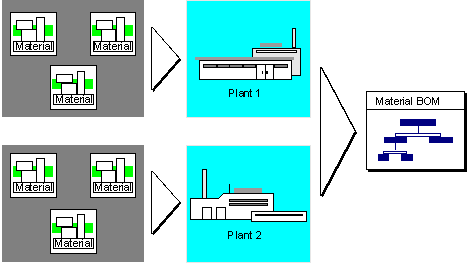

If you want to allocate the BOM for a material to a plant where the material already has a multiple BOM (identified by the same internal BOM number), you can only allocate one alternative from this BOM group to the material in this plant.
Plant allocations are also supported for equipment BOMs and functional location BOMs.