
 Stock Transfer from Plant to MRP Area
Use
- If you want to plan material requirements for a storage location separately, you can create an MRP area for this storage location. You can then procure materials that are planned for this MRP area using Stock transfer from plant to MRP area.
- If you plan components to be provided for a subcontractor using an MRP area of the subcontractor type, you can also procure the components to be provided using Stock transfer from plant to MRP area.
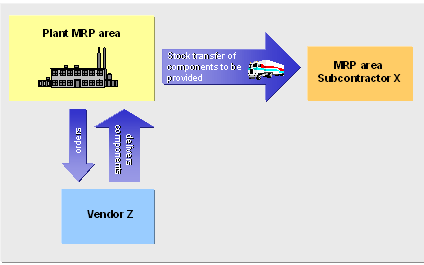
Integration
The process is the same as for Storage Location MRP. In contrast to the storage location MRP, you can use all MRP procedures and are not limited to the reorder point planning procedure.
Prerequisites
- In Customizing for MRP, you have created the special procurement key for Stock transfer from plant to MRP area for the plant in which the MRP area is located. You have defined the following parameters:
- Procurement type: F for External procurement
- Special procurement: U for Stock transfer
- Plant: Number of plant, to which the MRP area belongs.
- In the material master, you have created the MRP area segment and assigned the special procurement key Stock transfer from plant to MRP area.
Features
During MRP, the system generates a stock transfer reservation for the material in the MRP area and a material reservation in the plant MRP area.
The external procurement storage location that you have entered in the MRP area segment of the material master is used as the receiving storage location. If you have not maintained this field, the system uses the receiving storage location that you entered for the MRP area in Customizing.
The actual procurement is processed by the plant. With stock transfer to the MRP area, you carry out the transfer posting for the material with reference to the reservation.