
 Status History in the Status Log
Use
Changes in status are logged by the system.
A document info record contains the following status information:
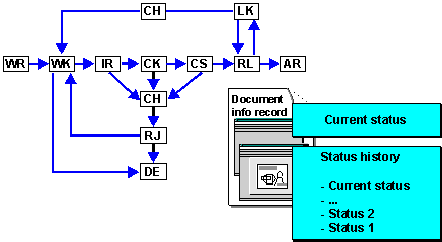
- Current processing status. This information appears on the Basic Data screen, in the Document status field.
- Complete status history. This information appears in the status log. The status log is a record that gives you an overview of which statuses a document has already had. A log field informs you about any changes to the status.
Prerequisites
You can only display the status history in the status log if the following conditions are met:
- A status network is defined for the document type of the document.
- You are in the change or display mode for the document.
Log field
In Customizing for the Document Management System, you can define for each document type which statuses require a log field entry, by choosing Control data → Define document types, then Define document status. In this case the status process is documented.
The log field can contain a short text up to 20 characters. The text is entered in a special dialog box. If the document status is defined to allow an entry to be made, the dialog box is displayed automatically after the status has been changed.
- In Customizing for the Document Management System, you can define for each document type which statuses require a log field entry by choosing Control Data → Define document types, then Define document status.
- There are the following types of log field entries:
- Entries that you may enter or must enter (depending on the document type)
- Entries that are made by the system (independently of the document type)
For example, when you archive a document, the system creates a log field entry, as well as setting the status concerned.
Features
In status log
- you have such information as
- Who set a status
- Which digital signature was necessary
- From the log field.
- You can execute further additional function such as
- Display user data from user that set the status
- Display information from the set digital signature
- Print status log
The following graphic shows that the status log offers important information in a very large status network about the process run and the current processing status.
Activities
On any tab page choose Extras → Status log. The current status is in the first line.