
 Screen Container and Customer-Specific Subscreen
Communication of Screens
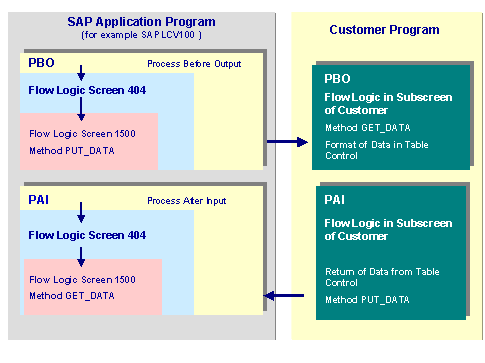
The flow logic of the screen container from R/3 (subscreen 1500) includes an interface for calling customer-specific processing screens for object link.
The customer-specific processing screen (screen type Subscreen) includes a table control for the preparation and processing of link data. The functions that are used to process the object link data are part of the program for screen container 1500.
The following graphic shows in simplified form the communication between screen container 1500 and the customer-specific subscreen.
Screens Dependent On Transaction
Depending on the current processing situation (transaction), the customer-specific subscreen is, using the screen container, generated for the maintenance of link data. If you program the subscreen to process link data, you need to note the flow logic for the corresponding screen container.
|
Transaction |
Screen Container |
|
CV01N Creates document CV02N Changes document CV03N Displays document |
Maintain Link Data |
|
CV04N Finds document |
Search for Document Using Link Data |
Customizing
To enable the system to generate a customer-specific subscreen, you need to choose Document Management in the settings in Customizing.