Classification for Document Management
Use
The classification system allows you to use characteristics to describe documents according to criteria that you define, and to group similar documents together in classes.
Integration of the classification system provides the following document search options:
- Comprehensive search functions provide a powerful tool for finding documents. You can display a document by selecting matchcode ID C - Find document via class on the initial screen.
- You can define extra fields for the Basic Data screen.
- You can assign keywords to a document.
Prerequisites
See: Before You Classify a Document
Features
Multiple classification is supported for documents. This means that you can allocate a document to more than one class of a specific class type.
The classification data is displayed on the screen Classification.
You can classify documents in the following processing situations:
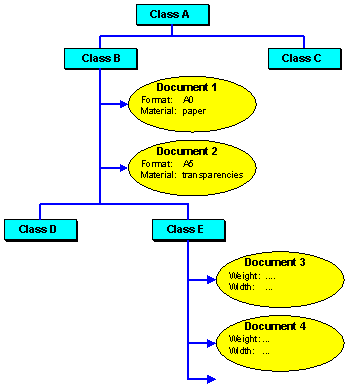
The following graphic shows how more than one document can be classified in different classes (for example, document 1 and 2 in class B). By assigning values to the characteristics (for example, format and material), you can describe the individual documents and separate them from one another (for example, format A0 and A5).